Government-issued photo ID
Proving that the clearance and the credential are yours
Where in the app: Onboarding → Background Check → Document Upload step, first card. · Facts last reviewed 2026-09-05A valid government photo ID is the one document that ties your background check, your credential and your I-9 to you. We need a clear image of the front of a driver’s license or state ID, or the photo page of a passport. It must be current — an expired ID cannot be accepted.
What we accept, what must be readable, what does not belong here
We accept
Driver’s license (front)
State-issued ID card (front)
Passport (photo page)
It must clearly show
Your photo and full name
Date of birth
The expiration date — the ID must not be expired
All four corners of the card or page, in focus, no glare over the text
Not this
A Social Security card, birth certificate, or insurance card
A photo of the back of the card only
An expired ID
Getting the document
1. Use what you have
A driver’s license, a state-issued non-driver ID or a passport. If your only ID is expired, renew it first — the DMV or passport receipt is not a substitute.
2. Photograph it well
Lay the card flat on a plain surface in good light, hold the phone directly above it, and make sure all four corners are in the frame with no glare over the text or the photo. Check the expiration date is readable before you upload.
What it looks like — examples
Illustrative example with made-up details — not a real document, not an official form. Real documents differ in layout; the numbered details are what must be readable.Example — Front of a driver’s license or state ID
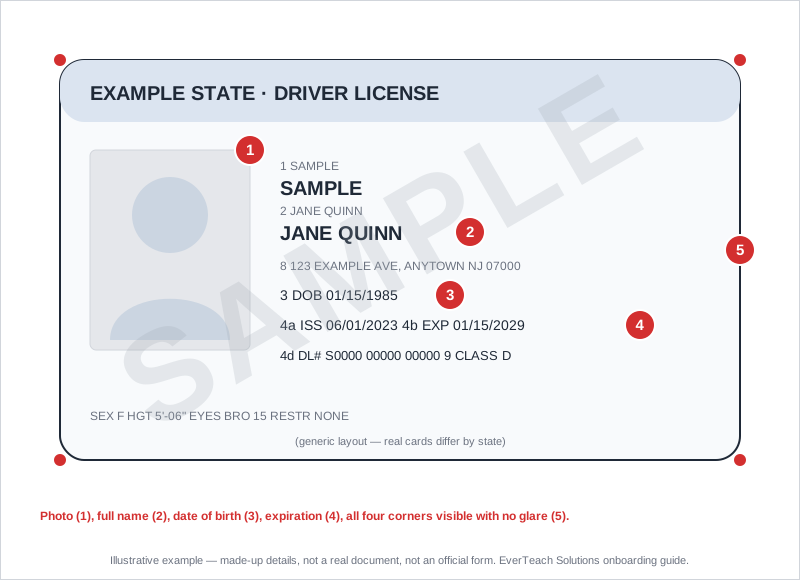
A generic card layout. Real cards differ by state; the numbered details are what must be readable.
- Your photo
- Full name — must match your application and your credential
- Date of birth
- Expiration date — must be in the future
- All four corners visible, no glare
Uploading it in EverTeach
1. Open Background Check → Document Upload
Sign in, open Onboarding → Background Check, and go to the Document Upload step. In New Jersey the Schedule Fingerprinting step before it asks two quick questions that decide whether you need a new appointment, an archive request or a transfer — answer those first.
2. Read the card’s “What to upload & what we check”
Each of the three cards — Government ID, Background Check, Clearance transfer / archive proof — lists what we accept and what does not belong there. The transfer card only appears when your answers say you need it.
3. Upload the file
Click Upload Document and pick a PDF, JPG or PNG under 5 MB. For your government ID you can also type its issue and expiration dates — optional, but it saves our team reading them off the scan.
4. Check your upload in the review window
Your file opens next to the checklist for that card. Confirm every line, then click “Yes, this is my …” — or replace the file if it is the wrong one. This is the moment to catch a TB result or a certificate that ended up in the wrong step.
5. Submit for review
Once the required documents are uploaded the check goes to our team. A rejected document comes back on the same card with the reason and an “Upload again” button, plus an email and an in-app message.
Questions we hear often
Do you need the back of the card?
No. The front is enough for this step. (The I-9 step later may ask for different documents — follow its own list.)
Is my ID stored safely?
Yes. It is stored encrypted, only our reviewing admins can open it, and it is shown through a secure viewer rather than downloaded to anyone’s computer.