TB test result
Tuberculosis screening for school staff
Where in the app: Onboarding → Health & TB step (after your district is chosen in Background Check step 1). You can work on this step and the Background Check in parallel. · Facts last reviewed 2026-09-05New Jersey schools must have a documented tuberculosis (TB) screening result on file for every new employee who works with students, and that includes substitutes. The result comes from a licensed provider — a clinic, urgent care, pharmacy clinic or your own doctor — and there is no single official form: what matters is that the test type, the date, the result and the provider are all readable.
What we accept, what must be readable, what does not belong here
We accept
Mantoux / PPD skin test result from a clinic, urgent care, or your doctor
IGRA blood test result (QuantiFERON-TB Gold or T-SPOT) — a lab report is fine
If you have ever tested positive: the chest X-ray report or your provider’s TB symptom checklist
It must clearly show
Your full name, spelled as on your ID
The type of test (Mantoux/PPD or IGRA / QuantiFERON / T-SPOT)
The date the test was placed or the blood was drawn
The result — for a skin test, the date it was read and the size in mm (e.g. “0 mm, negative”)
The clinic or provider’s name, with a signature or stamp
The whole page, in focus, nothing cut off — a phone photo is fine if every word is readable
Not this
A physical / medical clearance form — that goes under Health Screening
An appointment confirmation or a receipt for the test
A vaccination record
Don’t have it yet? Any urgent care, pharmacy clinic, or your doctor can do a TB test; a skin test needs a second visit 48–72 hours later to be read.
Getting the document
1. Check whether you already have a result
NJ Department of Health guidance says no new test is needed if you have a documented NEGATIVE result from the last six months, or a documented POSITIVE result from any time (a positive never needs repeating — see below). A negative older than six months does not count, however recent your last school job. If you have a qualifying result from a previous school job, a hospital job or a college program, upload it as it is.
2. If you need a test, choose a skin test or a blood test
A Mantoux / PPD skin test is placed on your forearm and must be read by the clinic 48–72 hours later — two visits. An IGRA blood test (QuantiFERON-TB Gold or T-SPOT) is a single blood draw with a lab report a few days later — one visit, usually more expensive. Either is accepted.
3. If you have ever tested positive
Do not take another skin test. Ask your provider for the chest X-ray report and the TB symptom checklist (a short form the provider completes) — NJ guidance uses those instead of a repeat test. Upload the provider’s document.
4. Make sure these are on the page before you leave the clinic
Your full name as on your ID, the test type, the date placed or drawn, the date read (skin test) with the size in millimetres, the result, and the provider’s name with a signature or stamp. A result without a date or without a provider cannot be accepted.
What it looks like — examples
Illustrative example with made-up details — not a real document, not an official form. Real documents differ in layout; the numbered details are what must be readable.Example 1 — Mantoux / PPD skin test result
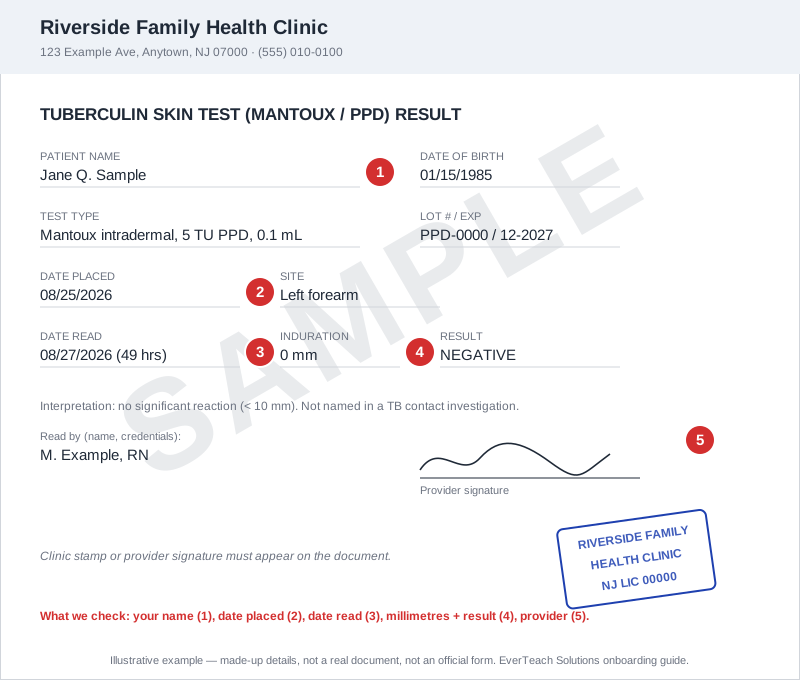
A typical clinic result slip for a two-visit skin test. Layouts vary by clinic; the numbered details are what must be readable.
- Your full name, as on your ID
- Date the test was placed
- Date it was read — 48 to 72 hours after placing
- Induration in millimetres and the result (here 0 mm, negative)
- Provider or clinic name with a signature or stamp
Example 2 — IGRA blood test (QuantiFERON) lab report
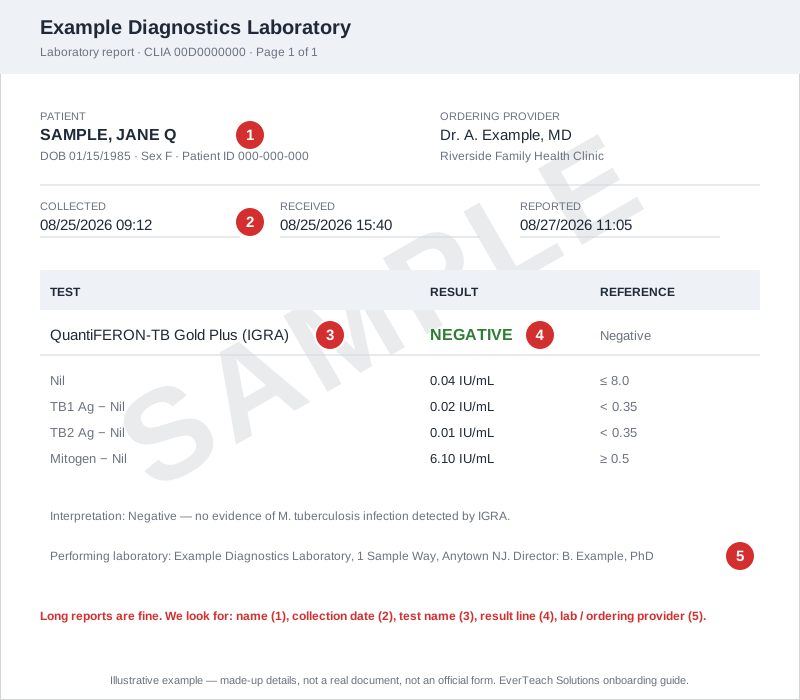
A laboratory report for a blood test. Long reports are fine — the result line is what we look for.
- Your full name and date of birth
- Collection date (the day blood was drawn)
- Test name — QuantiFERON-TB Gold Plus or T-SPOT.TB
- Result — NEGATIVE, POSITIVE or INDETERMINATE
- Laboratory name and the ordering provider
Example 3 — Prior positive: chest X-ray report + symptom checklist
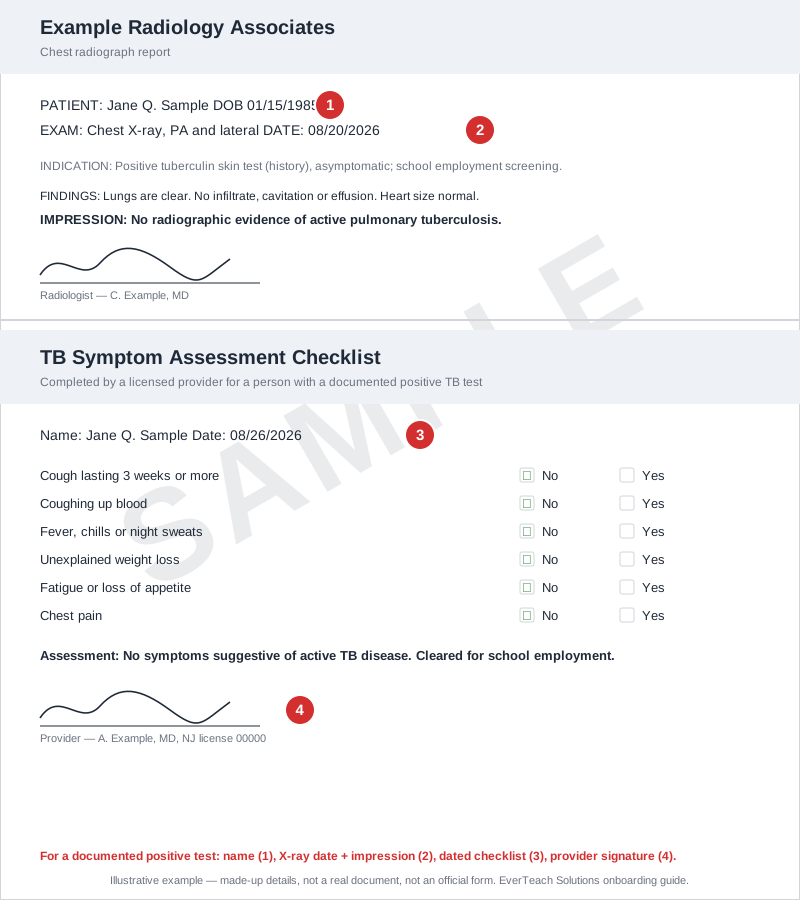
For someone with a documented positive test. The provider completes the checklist; the X-ray report shows no active disease.
- Your full name
- Chest X-ray date and the impression (“no evidence of active TB”)
- Symptom checklist completed and dated by the provider
- Provider signature and license type
Uploading it in EverTeach
1. Open the Health & TB step
Sign in, open Onboarding, and choose the Health & TB step. Tick the acknowledgement box; the upload cards appear underneath it.
2. Read “What to upload & what we check” on the card
Each card lists what we accept, what must be readable, and what does not belong there. If your file does not match, get the right document first — a wrong upload only adds a round trip.
3. Choose your file
Click Choose file and pick a PDF, JPG or PNG under 10 MB. A phone photo is fine when every word on the page is readable and nothing is cut off. You can also type the test date so we can remind you before it expires — optional.
4. Check your upload in the review window
Straight after the upload, your file opens next to a checklist. Look at each line and confirm your file shows it. If it does, click “Yes, this is my …”. If it does not — wrong document, blurry, cut off — click “No — replace this file” and choose another.
5. Wait for review
The card shows “Pending review”. Our team checks it within 1–2 business days. If something is missing you get an email and an in-app message naming the document and the reason, and the card shows “Rejected – re-upload” with the reason.
Questions we hear often
My result is on my patient portal — can I upload a screenshot?
Yes, if the screenshot shows your name, the test, the date, the result and the provider or lab. Crop nothing off; two screenshots are fine if one does not fit.
Is a TB test the same as the health screening?
No. In New Jersey they are two documents. The TB result goes in the TB Test card; the staff physical / medical clearance goes in the Health Screening card. Uploading the TB result to both is the most common mistake we see.
How long is it valid?
For hiring, New Jersey accepts a negative result dated within the last six months (the date it was read, or the date blood was drawn). Once accepted there is no state requirement to retest, though a district contract can ask for renewal. Enter the test details when you upload it and you will see straight away whether it is still within the window.