Health screening (staff physical)
Medical clearance to work in a school
Where in the app: Onboarding → Health & TB step (after your district is chosen in Background Check step 1). You can work on this step and the Background Check in parallel. · Facts last reviewed 2026-09-05New Jersey law lets a school board require a physical examination of its employees, and most districts do — separately from the TB test. It is a short form or letter signed by a doctor, nurse practitioner or physician assistant stating that you are fit to work with students. Many clinics call it a “school employee physical” or “staff health certificate”. Your district may hand you its own form; if so, use that.
What we accept, what must be readable, what does not belong here
We accept
A staff physical / medical clearance form signed by a doctor, nurse practitioner, or physician assistant
Your district’s own health certificate form, if they gave you one
A signed letter from your provider stating you are medically cleared to work in a school
It must clearly show
Your full name
The exam date
A statement that you are cleared / fit to work with students
The provider’s name, license type, and signature or stamp
The whole page, in focus, nothing cut off — a phone photo is fine if every word is readable
Not this
A TB test result on its own — in New Jersey that is a separate document and goes under TB Test
An appointment confirmation, receipt, or insurance paperwork
Lab results without a clearance statement
Don’t have it yet? Ask your doctor or a walk-in clinic for a “school employee physical” or “staff health clearance” — many clinics have a one-page form.
Getting the document
1. Ask whether your district has its own form
Some districts issue a one-page “employee health certificate”. If you were given one, take it to the appointment and have the provider complete and sign it.
2. Book a “school employee physical”
Your own doctor, an urgent care or a walk-in clinic can do it; it is usually a short visit. Tell them it is for school employment in New Jersey so they include a fitness-for-duty statement.
3. Make sure the paper says you are cleared
The form or letter must carry your name, the exam date, a clear statement such as “medically cleared to work with students” or “fit for duty”, and the provider’s name, license type and signature or stamp. Lab results on their own are not a clearance.
What it looks like — examples
Illustrative example with made-up details — not a real document, not an official form. Real documents differ in layout; the numbered details are what must be readable.Example — Staff physical / medical clearance form
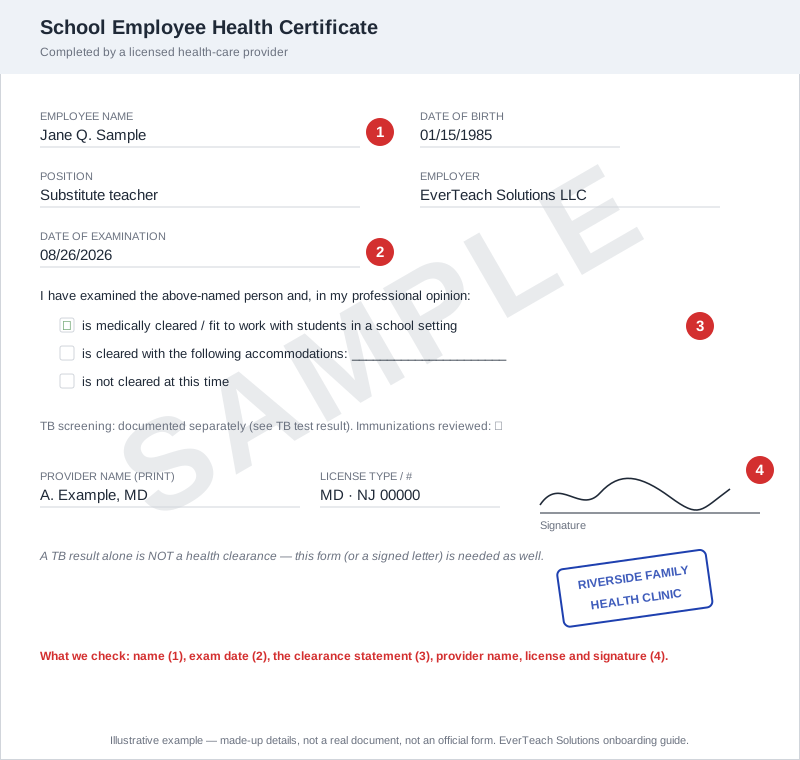
A typical clinic clearance form. Your district’s own form will look different but carries the same numbered details.
- Your full name and date of birth
- Date of the examination
- The clearance statement — “fit to work with students”
- Provider name, license type (MD, DO, NP, PA) and signature or stamp
Uploading it in EverTeach
1. Open the Health & TB step
Sign in, open Onboarding, and choose the Health & TB step. Tick the acknowledgement box; the upload cards appear underneath it.
2. Read “What to upload & what we check” on the card
Each card lists what we accept, what must be readable, and what does not belong there. If your file does not match, get the right document first — a wrong upload only adds a round trip.
3. Choose your file
Click Choose file and pick a PDF, JPG or PNG under 10 MB. A phone photo is fine when every word on the page is readable and nothing is cut off. You can also type the test date so we can remind you before it expires — optional.
4. Check your upload in the review window
Straight after the upload, your file opens next to a checklist. Look at each line and confirm your file shows it. If it does, click “Yes, this is my …”. If it does not — wrong document, blurry, cut off — click “No — replace this file” and choose another.
5. Wait for review
The card shows “Pending review”. Our team checks it within 1–2 business days. If something is missing you get an email and an in-app message naming the document and the reason, and the card shows “Rejected – re-upload” with the reason.
Questions we hear often
I uploaded my TB result here — is that enough?
No. A TB result on its own does not satisfy the health screening in New Jersey. Upload the signed physical / clearance form here and keep the TB result in the TB Test card.
Can it be a letter instead of a form?
Yes — a signed letter on the practice’s letterhead stating the exam date and that you are cleared to work in a school is accepted.